Top 10 Collaborative Calendars for Eastern Europe
Updated: 02.06.2026
Some of the most popular team calendars are mentioned below.
Users that searched for Top 10 Collaborative Calendars for Eastern Europe then also viewed the following software:
See also: Top 10: Task Management software for Eastern Europe
Users that searched for Top 10 Collaborative Calendars for Eastern Europe then also viewed the following software:
See also: Top 10: Task Management software for Eastern Europe
2025. ClickUp Launches Updated Calendar and Notepad with AI
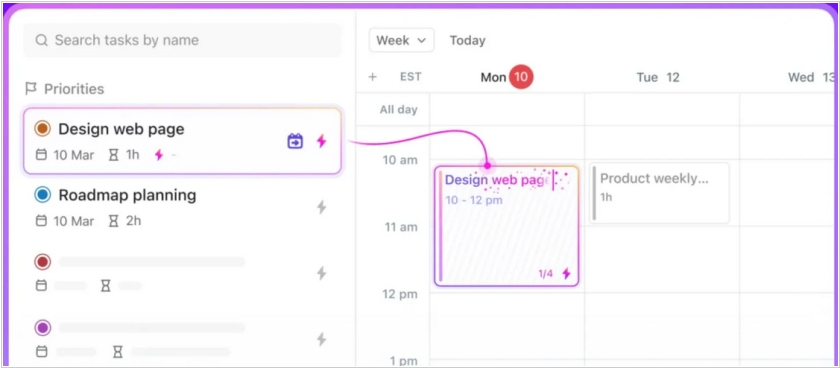
ClickUp has launched an updated calendar. It brings tasks, documents, chats and meetings together in one place. It also features a built-in AI assistant for creating meeting summary notes and intelligently scheduling time for tasks. Previously, the ClickUp calendar focused on team management and planning. Now, it focuses on personal productivity and prioritizes tasks. Users can create a task queue, and the calendar will automatically book time for them according to their schedule. The calendar can also dynamically adjust task due dates based on schedules and priority changes. ClickUp also introduced an updated notepad, which connects to online meetings and creates structured meeting notes and transcripts. It can also automatically assign actions and tasks to teammates.
2024. Notion unveiled standalone online calendar
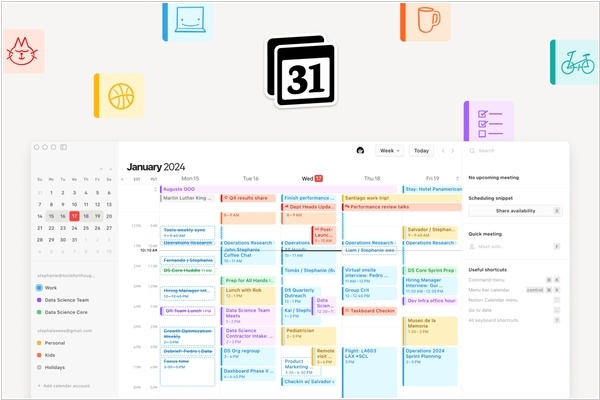
Popular note-taking service Notion has suddenly released a standalone calendar app, Notion Calendar. This is the reincarnation of the Cron service, which Notion acquired two years ago. While Notion has long had a calendar format for notes, it was a fairly isolated calendar, not connected to Google Calendar or other external sources. The new app, which is already available on Mac, Windows, iOS, and the web, can integrate all personal and work calendars a user uses, allowing them to plan their day. While the app can operate independently of the main Notion service, if you're a Notion user, Notion Calendar allows you to attach notes and documents from Notion to calendar events.
2021. Google Workspace Adds New Features for Home and Mobile Workers
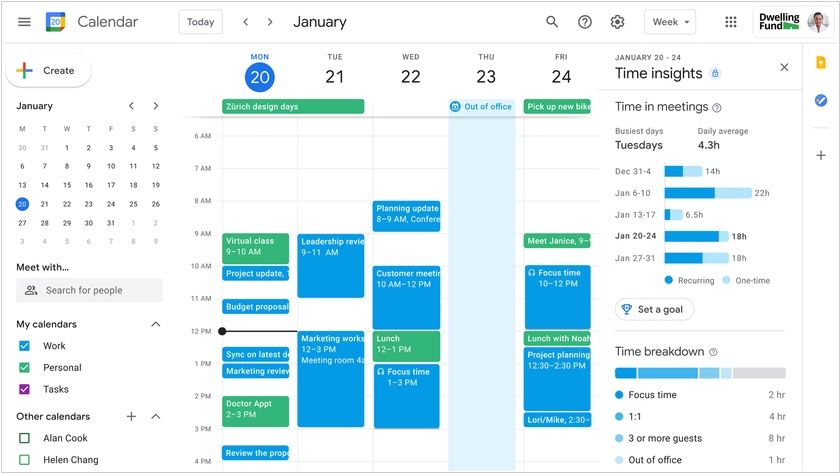
Google has rolled out a major update to its online office suite Workspace. For those users who frequently work from home, Calendar now offers useful features: the ability to set segmented work hours, recurring out-of-office hours, Focus Time (periods during which you cannot be interrupted), display of your current location (so others can see whether you're at home or in the office), and analytics on work time use. And for employees who work on-site, on-site, or on the front lines, Google has released a dedicated version of the office suite – Google Workspace Frontline – with a focus on secure mobile access to applications and data, as well as the ability to quickly create custom applications for data entry on the go.
2021. Worksection adds weekend/vacation schedule
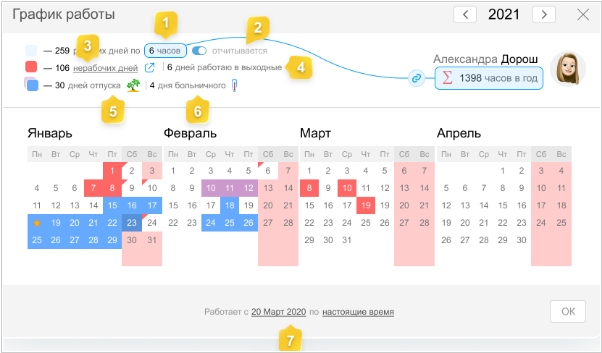
Worksection project management platform now features a schedule of weekends, vacations, and sick leave. This data helps calculate the efficiency of employee time expenditure over any period. You can set a standard work hour for an employee and immediately see how many hours they work per year, taking into account all holidays, weekends, vacations, and sick leave. In the People Report, the developers have added a pie chart for analyzing current efficiency next to each user, department, and team. Current efficiency is calculated as a percentage of entered time expenditure relative to the standard work hours for the previous period.
2014. Asana added calendar view
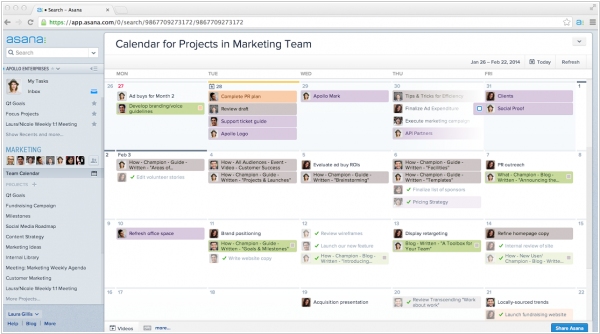
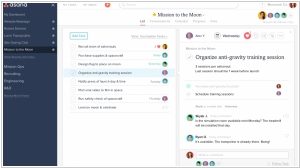
The developers of the popular collaboration and project management service Asana also understand that task lists need to be visualized to give managers a better overview. But they decided to implement this visualization in a more traditional way – as a calendar. Now, in a traditional online calendar, you can see tasks by assignee and by day of the week. Tasks can be easily dragged and dropped. But the most remarkable thing is that you can display absolutely any task list on the calendar (in any context). You can display tasks by project, by a specific employee, or by multiple employees. You can show tasks with an "Overdue" status or tasks with the word "XYZ" in the description – for example, to show tasks by client. Moreover, any calendar can be saved to "Favorites" and even shared with colleagues.
2008. GMail and Google Calendar to get offline mode

Good news has come from the blog Google Operating System. Within six weeks, Google plans to add support for Google Gears to GMail and Google Calendar. This means data synchronization between your computer and the server and the ability to work with mail and calendar offline. This is especially important for business users who travel frequently and for whom it is important to have a "plan B" in the event of even a short-term internet outage. What's more, synchronization will work using the open SyncML protocol, which is supported by most mobile phone manufacturers (Motorola, Nokia, Sony, LG), and also supports Push Email technology. Therefore, it is logical to expect GMail and Google Calendar synchronization with mobile devices in the near future.