Top 10 Time Trackers for Eastern Europe
Updated: 04.06.2026
Some of the most popular time-tracking apps are mentioned below.
Users that searched for Top 10 Time Trackers for Eastern Europe then also viewed the following software:
See also: Top 10:
Users that searched for Top 10 Time Trackers for Eastern Europe then also viewed the following software:
See also: Top 10:
2016. Worksection adds smart notifications, time-tracker and hotkeys
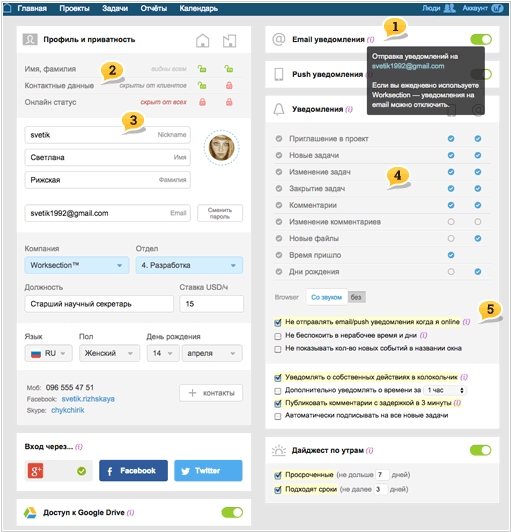
The popular online project management service Worksection has rolled out a major update. In short, the notification system has been updated (it's now flexible), the ability to use @mention to notify specific employees has been added, hotkeys have been added for all key functions and pages, the ability to specify exact time in task due dates has been added, time tracking for days off and work hours has been added, and the recurring task system has been completely redesigned. The main interfaces have been redesigned: creating projects and tasks, inviting people to a team, task lists, menus, etc., and the ability to bulk add tasks with a hierarchy has been added.
2013. Zoho Projects now has mobile apps

Project management service Zoho Projects is very popular due to its low price and wide functionality. Now it has full-fledged mobile clients for iPhone and Android. So now you can continue working from a mountaintop or a yacht (like in this video). The Zoho Projects mobile app delivers notifications about the latest project team activities, allows you to work with tasks and documents, communicate with colleagues in comments, and track time using the time tracker. You can also take a photo directly from the app and send it to a project – in many cases, this can replace typing on a small smartphone keyboard. As a reminder, Zoho Projects has a free version for one project. The paid version starts at $20/month (for unlimited users).
2007. Cashboard allows to track time and money
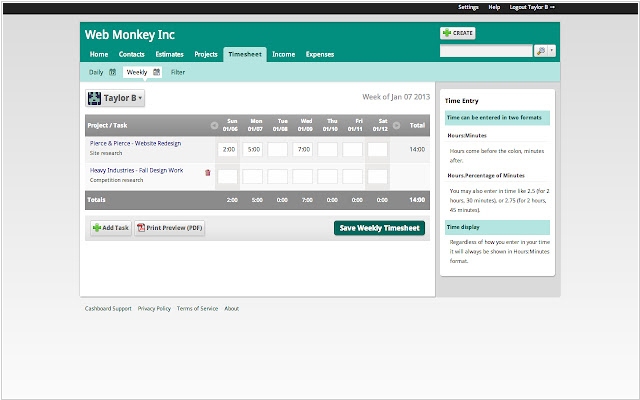
The new service Cashboard allows you to track time spent on work and automate invoicing. Working with Cashboard begins with creating a new project, to which the user adds specific tasks. In addition to a name and brief description, you can specify how much time should be devoted to this task. Cashboard groups the entered data into a common table, which then allows you to conveniently analyze bottlenecks—where too much time is spent, where cash costs need to be reduced, etc. When working with projects and tasks, the Timesheet, which is a simple calendar, can also be useful. Users enter data there, indicating when exactly they need to start working on a particular task. Cashboard has a free version, which allows you to work with only one active project (you can have as many completed projects as you like). The number of clients and employees on this plan is unlimited.