Top 10 Android Project Management apps
Updated: 02.06.2026
Some of the most popular Android project management apps are mentioned below.
Users that searched for Top 10 Android Project Management apps then also viewed the following software:
See also: Top 10: Project Management Software for Eastern Europe
Users that searched for Top 10 Android Project Management apps then also viewed the following software:
See also: Top 10: Project Management Software for Eastern Europe
2020. WEEEK released Android app for project management
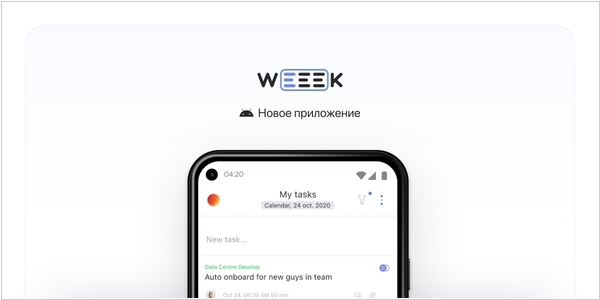
The developers of the WEEEK, a task and project management platform, have released a completely new version of the Android app. It's written from scratch in Kotlin and is faster and more stable. The interface is now similar to the web version, so there's no need to get used to it. New features have been added to the existing ones: notifications, filters, task settings, and much more.
2015. Wrike for Android gets Inbox feature.
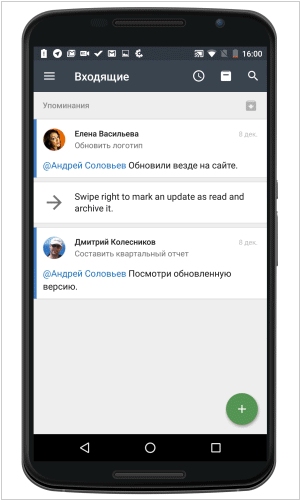
Wrike's Android app for project management and team collaboration system, has been updated. The main new feature is the Inbox feature, which allows you to quickly sort through the flood of incoming messages about tasks in progress. Every day, employees receive numerous notifications about work progress, new tasks, and other work-related messages. This can be time-consuming, and there's a high risk of missing something important. Wrike solved this problem with the Inbox feature. Now, the most relevant messages, such as requests to employees and notifications about new tasks, are always at the top of the list. The messages themselves are now presented as cards, allowing you to understand the gist of the message without even opening it. After reading a message, you can archive it with a single tap.
2015. Worksection unveiled mobile app
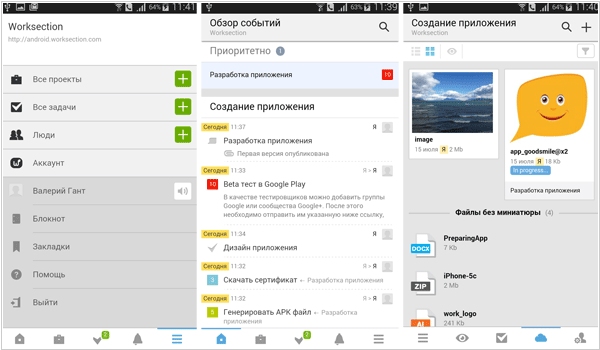
Worksection, a popular collaboration and project management service, has released free mobile apps for iOS and Android. Now users can access their projects, tasks, files, notes, and contacts (colleagues) from their smartphones or tablets. Users can create new tasks, add comments, upload files, receive push notifications, and track their time using the time tracker. The app conveniently tracks the latest project changes using the activity feed. Key features can be used offline: project, task, and bookmark lists, people and contact lists, a notepad, and recent events.
2014. Basecamp for Android is now available
The creators of the project management service Basecamp long relied on their mobile web interface as the primary way to access the service from smartphones. But then (about a year ago), they finally released a mobile app for iPhone, and now an Android app is coming. Like the iOS app, the Android client allows you to track the latest project changes (task completions, new file uploads, etc.), add comments, upload files directly to Basecamp or via Dropbox or Google Drive, receive notifications, and view your tasks and calendars. The mobile app's interface is designed to mimic the "paper" web version.
2013. Zoho Projects now has mobile apps

Project management service Zoho Projects is very popular due to its low price and wide functionality. Now it has full-fledged mobile clients for iPhone and Android. So now you can continue working from a mountaintop or a yacht (like in this video). The Zoho Projects mobile app delivers notifications about the latest project team activities, allows you to work with tasks and documents, communicate with colleagues in comments, and track time using the time tracker. You can also take a photo directly from the app and send it to a project – in many cases, this can replace typing on a small smartphone keyboard. As a reminder, Zoho Projects has a free version for one project. The paid version starts at $20/month (for unlimited users).
2013. Asana released mobile app for Android.
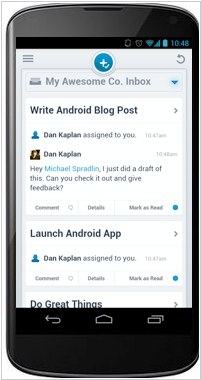
Popular task management service Asana has released a mobile client for the Android platform. The iPhone app has been available for five months. Asana mobile allows you to create and edit tasks, and assign responsibility. You can also set due dates, schedules (for recurring tasks), and add notes, tags, and comments. The developers particularly highlight the search function, which displays not only your tasks but also all records added to the system by other employees.