Top 10 Excel Project Management Tools
Updated: 02.06.2026
Some of the most popular Excel project management tools are mentioned below.
Users that searched for Top 10 Excel Project Management Tools then also viewed the following software:
See also: Top 10: Project Management Software for Eastern Europe
Users that searched for Top 10 Excel Project Management Tools then also viewed the following software:
See also: Top 10: Project Management Software for Eastern Europe
2020. Microsoft unveiled tool for evaluating remote employee performance
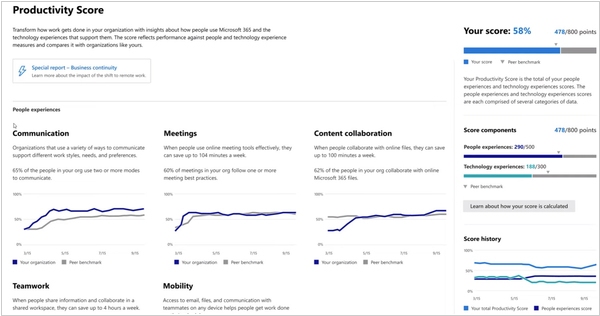
Microsoft has released a new tool, Productivity Score, to help managers determine whether remote employees are productive. It can be found in Microsoft 365, in "Work Analytics." The tool collects behavioral data for each user of their package across 73 metrics. And at the end of each month, it provides managers with an analysis of the quality of their work. Among other things, the collected information includes: whether the employee regularly turns on the webcam during online meetings; how often they send emails; how often the employee adds comments to shared documents or group chats; and how many days they used Word, Excel, Teams, Outlook, and Skype in the last month. Your score can be compared with other companies. There is also a "Recommended Actions" tab, which contains tips on how to train employees to use Microsoft 365 products better to increase productivity.
2020. Microsoft launches Lists, a new Airtable-like app for Microsoft 365
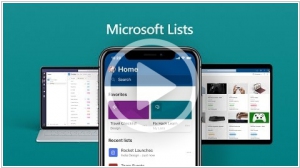
Microsoft launched Lists - a new database-collaboration app for Microsoft 365 users. It's similar to Airtable or Smartsheet, but with the addition of all the usual Microsoft integrations one would expect. The way Microsoft describes it, Lists is a tool to “track issues, assets, routines, contacts, inventory and more using customizable views and smart rules and alerts to keep everyone in sync.” It features deep integrations into Teams, SharePoint and other Microsoft products and will launch this summer on the web, with mobile apps slated for later this year. Lists include different ways to visualize your lists. For now, there are three views: grid, gallery and calendar.
2007. Smartsheet - an Excel-like task management system
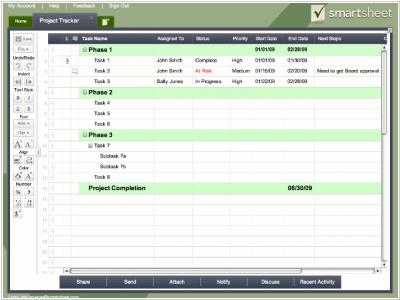
Smartsheet is an online task, project and process management tool designed specifically for small teams. It helps project managers track how effectively employees are fulfilling their responsibilities. This means it's not just another spreadsheet, as the name might suggest. Smartsheet has a simple and user-friendly interface, so if you've worked with MS Excel, you'll quickly get the hang of this web application. The operating principle is borrowed from spreadsheet programs: a large table is displayed on the user's screen, where individual cells indicate the assigned task, the person responsible, the current status, the due date, and comments. All this is accompanied by the ability to attach files (for example, additional task-related materials), use templates, and more. Using the message center, you can receive and send requests (including scheduled ones), and receive task updates and alerts. As for user management, they can be combined into groups.