Google Calendar
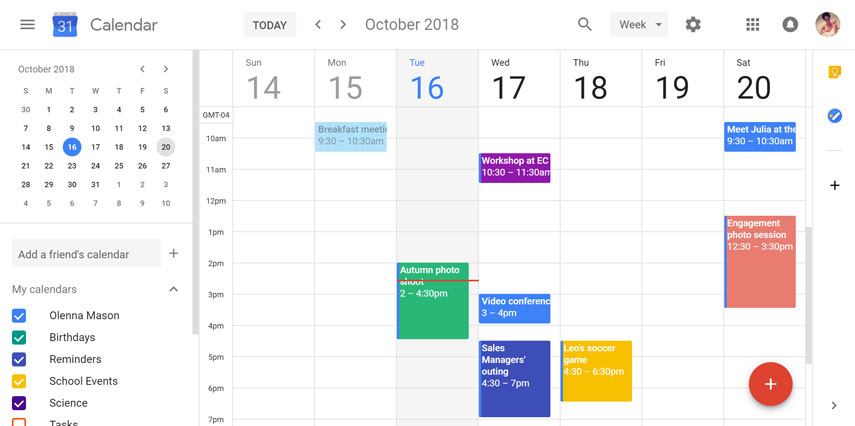
Google Calendar is a free time-management web application offered by Google. The Ajax-driven interface enables users to view, add, and drag-and-drop events from one date to another without reloading the page. It supports view modes such as weekly, monthly, and agenda. Google Calendar allows multiple calendars to be created and shown in the same view. Each can be shared, either read-only or with full edit control, and either with specified people or with everyone (public calendars).
Comments: 1
Comments: 1
Alternatives and relevant products
Users who were interested in Google Calendar, then also viewed:
News about Google Calendar
2015. Google Calendar is available on iPhone

Google launched the revamped calendar app for Android back in November, and now Google Calendar officially landed on the iPhone. iPhone users were always able to import Google calendars into the standard iPhone Calendar app, or other third-party apps, but now Google Calendar finally has an iOS app to call its own. It comes with new features, like Events from Gmail, which automatically transforms events from emails into Calendar events. There are also Assists, which is a kind of autocomplete, suggesting text from different sources to make filling out Calendar event forms much quicker. Lastly, it has a new scrollable format called Schedule View. This view is more intuitively designed for mobile.
2011. Google restores offline access to GMail, Calendar and Docs in Google Chrome
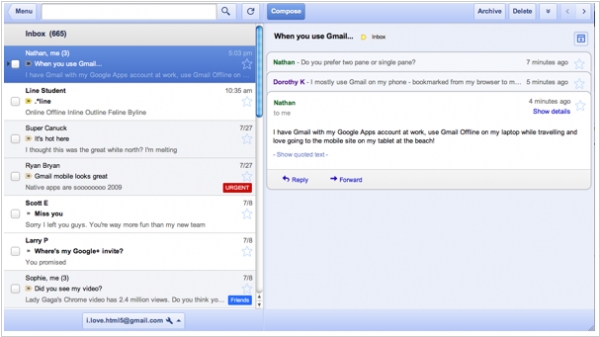
As you know, earlier GMail, Google Calendar and Google Docs supported offline mode in all browsers using Google Gears plug-in. But then Google decided to bet on HTML5 and abandoned its own proprietary plug-in. The Gears was quickly removed from the Chrome browser (in Firefox and IE it still works). And today Google developers were happy to announce that the offline mode for these apps in Chrome is back and it is implemented on HTML5. However, for an average user it will look no better than it was before: for offline access you still need to install an app (from the Chrome Web Store). In addition, the interface of the offline app is different from the usual web-based GMail interface. It looks lie GMail for iPad. ***